You sit down for a quick dinner, but after three minutes, your leftovers are scorching on one side and ice-cold on the other. It’s a classic sign that your appliance has stopped spinning. That strange grinding noise coming from the kitchen only adds to the frustration of a disrupted evening. We know how much you rely on your major kitchen appliances to keep your home running smoothly. Finding a reliable microwave turntable not turning fix is often simpler than you might expect. Most homeowners worry about the dangers of high-voltage repairs, but many issues stem from basic mechanical blocks you can solve safely.
This guide will help you troubleshoot the problem from the ground up. You’ll learn how to inspect the support rollers, check the drive bushing, and determine if the motor itself has finally given up. We’ll provide clear steps to restore that smooth, silent rotation you need for evenly heated meals. While some fixes involve a quick cleaning, others require a deeper look at your built-in or over-the-range unit. You’ll gain the confidence to handle the basics and know exactly when to call a trusted East Valley expert for a professional repair.
Key Takeaways
- Understand why a spinning plate is essential for eliminating cold spots and ensuring your meals heat evenly.
- Discover how simple cleaning and clearing obstructions often provide a quick microwave turntable not turning fix.
- Learn to inspect the drive coupler and roller ring for physical damage like cracks or stripped plastic.
- Identify the signs of a failed motor and understand the safety steps required to access internal components.
- Know when to skip the DIY and call a professional for complex repairs on built-in or over-the-range microwaves.
Why Your Microwave Plate Needs to Spin
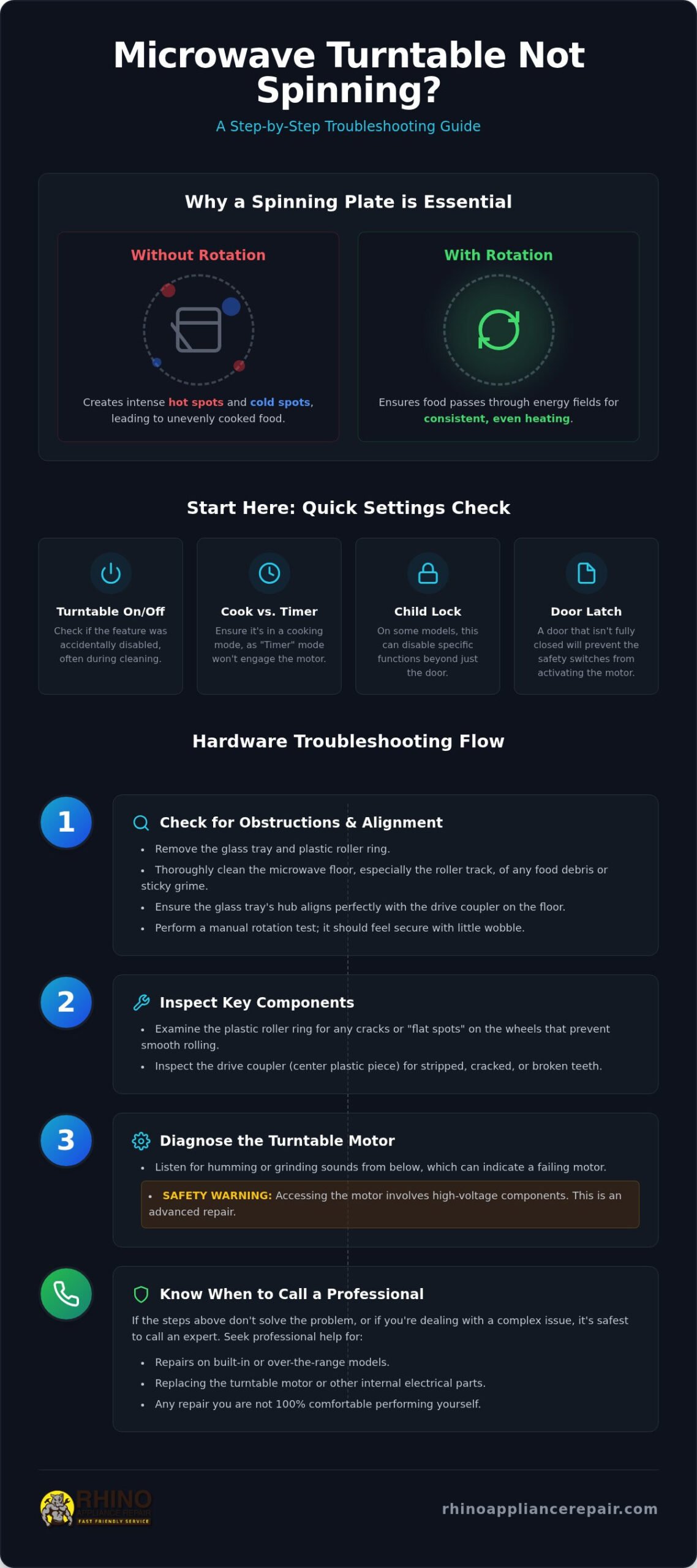
When you pull a bowl of soup out of the microwave and find the edges boiling while the center is frozen, you’re dealing with more than just a minor annoyance. You’re seeing the direct result of a stalled turntable. Many homeowners assume their appliance is dying, often searching for a “microwave not heating” solution when the real culprit is a lack of motion. Finding a reliable microwave turntable not turning fix starts with understanding that movement is actually part of the cooking process. Without that rotation, the energy inside the cabinet can’t reach your food evenly.
The Science of Even Heating
Inside your microwave, a component called a magnetron generates electromagnetic waves. These waves bounce off the metal walls, creating a pattern known as “standing waves.” These waves don’t move; they stay fixed in specific patterns that create intense hot spots and stone-cold valleys throughout the cavity. While some high-end units use a stirrer fan at the top to deflect waves, this rarely provides enough coverage for dense meals. The turntable is the primary tool for ensuring thermal consistency by rotating food through these static energy fields. Without this constant motion, the waves hit the same spot repeatedly, leading to scorched surfaces and raw centers.
Initial Troubleshooting Checklist
Before you grab your toolbox or worry about expensive repairs, check the simplest possibilities first. Modern over-the-range and built-in microwaves are complex, but sometimes the “breakdown” is just a setting. A crucial first step in any microwave turntable not turning fix is a quick settings check. Verify these three things immediately:
- The Turntable Button: Many major residential models have a “Turntable On/Off” feature. This is designed for large, rectangular casserole dishes that can’t rotate. You might have bumped it during your last cleaning session.
- Timer vs. Cook Mode: It sounds simple, but it happens often. If the microwave is in “Timer” mode, the light stays on and the countdown runs, but the magnetron and motor won’t engage.
- The Child Lock: On some specific brands, the child lock doesn’t just lock the door; it can disable specific internal functions or prevent a cycle from starting properly.
- Door Latch Integrity: If the door isn’t fully latched, the safety switches won’t allow the motor to spin. Ensure no crumbs or debris are blocking the latch assembly.
If your settings are correct and the door is sealed, but that plate still refuses to budge, it’s time to look at the mechanical components. Most issues with major residential units involve the physical parts that sit directly under your glass tray.
Step 1: Check for Obstructions and Alignment
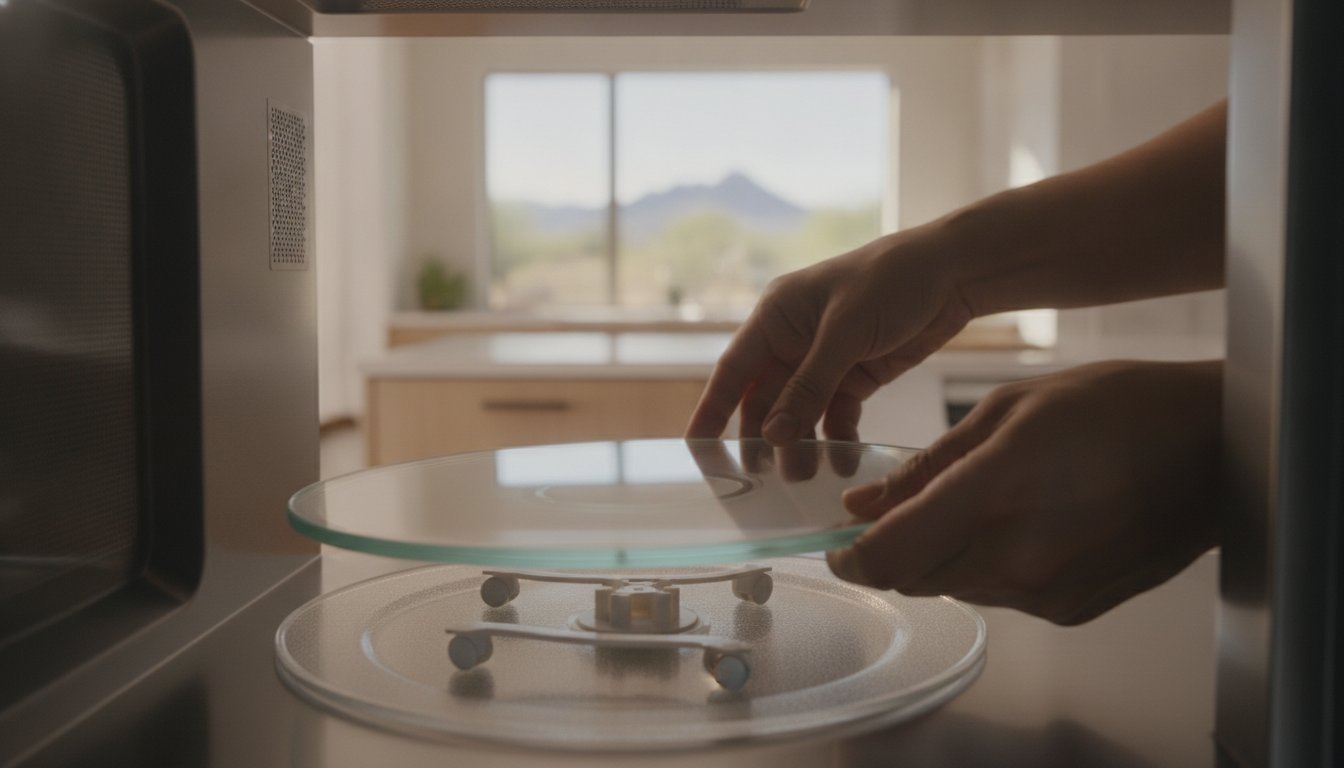
Before you assume the motor has died, look at the path of least resistance. Physical obstructions are the most common reason for a stalled plate. Most homeowners skip this step, but it’s the fastest microwave turntable not turning fix available. Start by lifting out the glass tray and the plastic support ring underneath to get a clear view of the microwave floor. Even a small piece of pasta or a dried spill can wedge itself under a roller wheel, bringing the entire mechanism to a halt.
Living in the East Valley means dealing with fine Arizona dust. This dust finds its way into every corner of your home, including your kitchen appliances. When this desert grit mixes with the steam and grease from daily cooking, it creates a thick, sticky “grime paste.” This sludge builds up in the circular roller track, creating enough friction to stop the wheels from turning. If your built-in unit still won’t budge after a deep clean, it might be time for professional microwave repair to check the internal drive components.
Cleaning the Roller Guide
Take the roller ring to the sink and wash it thoroughly in warm, soapy water. Use a small brush to clear any debris from the axles of the tiny wheels. While the ring is out, scrub the floor of the microwave with a non-abrasive sponge. Pay close attention to the track where the wheels travel. Hardened sugar or protein spills act like speed bumps. If you notice “flat spots” on the plastic wheels, the ring needs replacement. Flat wheels slide rather than roll, which puts unnecessary strain on the motor.
Proper Tray Seating
The glass tray isn’t just sitting there; it has to lock into the drive mechanism. Look at the center of the microwave floor for a plastic piece called the drive coupler. The bottom of your glass tray has a matching notched hub. If these aren’t perfectly aligned, the tray will wobble or remain stationary while the motor spins underneath it.
- Align the Teeth: Drop the tray onto the coupler and rotate it slowly by hand until you feel it drop into place.
- Manual Rotation Test: With the power off, try to nudge the tray. It should have very little “play” if it’s seated correctly.
- Inspect the Hub: Check the center of the glass tray for chips or cracks. A worn-out hub won’t grip the coupler, causing the tray to slip during a cycle.
Step 2: Inspecting the Drive Coupler and Roller Ring
If cleaning the track didn’t provide a microwave turntable not turning fix, the problem likely lies in the transmission. The drive coupler is the small plastic piece that sits in the center of the microwave floor. It acts as the bridge between the motor shaft and the glass tray. Over years of daily use, the plastic becomes brittle from constant heat cycles. This leads to cracks or stripped edges that prevent the motor from gripping the tray properly.
Removing the coupler is a simple task on most major residential models. Grasp the plastic piece firmly and pull it straight up. If it’s stuck due to dried spills, don’t reach for the pliers yet. You might snap the motor shaft. Instead, use a damp cloth for a better grip and wiggle it gently as you pull upward. Once it’s out, flip it over and look at the connection point. It should be a clean, sharp shape. If the hole looks rounded or has visible stress fractures, the motor will spin inside the coupler without actually moving the tray.
Signs of a Stripped Coupler
A stripped coupler often mimics more serious electrical failures. You’ll hear the motor humming, but the tray remains stationary or moves in small, jerky increments. This happens when the motor shaft catches on a small piece of remaining plastic before slipping again. In some cases, the friction between the metal shaft and the failing plastic creates a faint smell of burning plastic. If you notice this, stop the cycle immediately. A damaged coupler is an inexpensive part, but running the unit with a slipping connection can put unnecessary strain on the motor assembly.
- Visual Cracks: Look for hairline fractures in the D-shaped hole.
- Rounded Edges: The interior should not be a perfect circle.
- Debris: Check for plastic shavings on the microwave floor.
Roller Support Failure
The roller ring does more than just hold wheels; it maintains the balance of the entire tray. Heavy glass trays combined with large meals put significant pressure on this plastic ring. Over time, the heat can cause the ring to warp or sag. If the ring is no longer perfectly flat, one side of the tray will drag against the floor, creating enough resistance to stall the motor. Check for missing wheels or broken axles that might cause the assembly to tilt. If you’re noticing issues with other kitchen appliances, our guide on expert range repair in East Valley AZ can help you keep your entire cooking suite in top shape.
Step 3: Diagnosing a Failed Turntable Motor
If you’ve cleared the track and verified that the coupler is intact, the electrical motor is your likely suspect. This component is the small engine located directly beneath the microwave floor that provides the torque needed to rotate heavy glass trays. Accessing it usually requires removing a bottom access panel or, in some models, the entire outer cabinet. This is the point where a simple microwave turntable not turning fix becomes a technical project involving electrical diagnostics and specific safety protocols.
Safety Warning: High-Voltage Capacitors
This is the most critical part of any microwave repair. Microwaves are not like standard household appliances. They contain a high-voltage capacitor that stores a lethal electrical charge even after the unit has been unplugged for days. This component acts like a heavy-duty battery, holding thousands of volts that can cause severe injury or death if touched. Never open the outer cabinet of your microwave unless you have professional training in discharging these capacitors safely. Because built-in and over-the-range units are integrated into your kitchen’s electrical system, they require professional handling to ensure your home remains safe.
Testing for Motor Continuity
If you have a bottom access plate that allows you to reach the motor without opening the main cabinet, you can test the component using a multimeter. This tool determines if the electrical path inside the motor is still intact. Follow these steps to diagnose the part:
- Disconnect Power: Unplug the unit or turn off the dedicated breaker in your service panel.
- Remove the Access Plate: Unscrew the small metal panel on the bottom of the microwave to reveal the motor.
- Disconnect the Wires: Carefully pull the two wire spade connectors off the motor terminals. You may need needle-nose pliers for a better grip.
- Check Continuity: Set your multimeter to the lowest Ohms setting. Touch the probes to the motor terminals.
A functioning turntable motor should show a resistance reading between 2,000 and 3,000 Ohms, though this specific number varies by manufacturer. If your multimeter displays “infinity” or “OL” (Open Loop), the internal copper windings have burned out. This confirms the motor is dead and requires a full replacement. If the technical nature of these tests feels outside your comfort zone, it’s much safer to request professional microwave motor repair from a qualified technician who can handle high-voltage components with ease.
When to Call an East Valley Repair Expert
Not all microwaves are created equal. If you own a small countertop unit, a professional microwave turntable not turning fix might cost more than a brand-new box from a local retailer. We value honesty and transparency with our neighbors. For those portable units, replacement is almost always the smarter financial move. However, if you have a built-in or over-the-range model, the situation changes completely. These major residential appliances are integrated into your home’s design and hardwired into your electrical system. They represent a significant investment for homeowners in Gilbert and Mesa. These units are built to last and are well worth the effort of a professional repair.
Repair vs. Replace for Microwaves
We recommend the “50% Rule” for all major kitchen appliances. If the cost of the repair exceeds half the price of a new, comparable unit, it’s usually time to replace it. You should also consider the age of your appliance. Most high-quality residential microwaves have a functional lifespan of 7 to 10 years. If your unit is only a few years old and you need a microwave turntable not turning fix, a simple motor or coupler replacement is a highly logical and cost-effective choice. Maintaining a high-performing kitchen involves monitoring all your cooking tools. If you’ve noticed your oven temperature not accurate repair needs attention alongside your microwave, addressing these issues together ensures your kitchen remains the heart of your home.
Local Service in Gilbert, Chandler, and Beyond
Rhino Appliance Repair operates as your trusted neighbor for complex kitchen fixes. We specialize in over-the-range and built-in units that require specialized tools and knowledge. Our dedicated team serves the entire East Valley, including Gilbert, Chandler, Queen Creek, Tempe, Mesa, and San Tan Valley. We have extensive experience servicing major residential brands like Samsung, LG, and GE. Attempting to pull an over-the-range unit down for a DIY motor repair is physically demanding and dangerous. One slip can lead to broken tiles or damaged cabinetry. Let us handle the heavy lifting and the technical diagnostics. We take pride in our craftsmanship and want to help you get back to serving perfectly heated meals to your family. If your refrigerator is also showing signs of trouble in the desert heat, our refrigerator repair Mesa AZ service can protect your groceries and restore your kitchen to full working order.
Restore Even Heating to Your Kitchen
A stalled turntable doesn’t have to mean the end of your appliance. By checking for simple obstructions or inspecting the drive coupler, you can often find a microwave turntable not turning fix without a major headache. For homeowners with integrated over-the-range or built-in units, these steps ensure you aren’t wasting energy on unevenly cooked meals or dealing with frustrating cold spots. Most mechanical issues are straightforward, but internal electrical diagnostics always require a specialized touch for safety.
If the problem involves high-voltage testing or motor replacement, don’t take unnecessary risks with your home. Our family-owned team provides fast and friendly residential service across Gilbert, Mesa, and Chandler. We have the expertise to handle all major residential kitchen appliance brands, ensuring your built-in unit is back to peak performance quickly. Schedule Your Microwave Repair in the East Valley today. You deserve a kitchen that works as hard as you do.
Frequently Asked Questions
Is it safe to use a microwave if the turntable is not spinning?
Yes, it is generally safe to use your microwave even if the plate doesn’t move. The magnetron still emits waves, but they won’t hit the food evenly. You’ll likely deal with cold spots and scorched edges. To prevent foodborne illness, stir your food frequently and use a thermometer to check internal temperatures. While safe, it’s a sign that you need a microwave turntable not turning fix to restore proper function.
How much does it cost to replace a microwave turntable motor?
The total cost for a motor replacement depends on your specific brand and the complexity of the installation. For major residential units like over-the-range models, the price includes the cost of the OEM part and professional labor. While countertop units are often replaced entirely, repairing a high-end built-in model is a smart investment. A local expert can provide a detailed quote after a diagnostic visit to your East Valley home.
Why is my microwave making a grinding noise while it spins?
Grinding noises usually signal a mechanical struggle under the tray. This often happens when food debris or Arizona dust gets trapped in the roller wheels. If the wheels are clean, the internal gears of the turntable motor might be stripped or failing. Ignoring this sound can lead to a total motor burnout. Cleaning the track immediately is the best first step to silence the noise and prevent further damage to your appliance.
Can I replace the microwave drive coupler myself?
You can easily replace a drive coupler on most residential models without using any tools. This plastic piece usually pulls straight up and off the motor shaft. If it’s stuck, a gentle wiggle with a damp cloth for grip should release it. Be sure to buy the exact replacement part for your specific model number. If the coupler is cracked or rounded out, replacing it is a very simple and effective DIY fix.
Does a non-spinning plate mean the magnetron is broken?
A stationary plate does not mean your magnetron is failing. The magnetron produces the heat, while the turntable motor provides the motion. If your food is getting hot but the tray isn’t moving, the magnetron is working fine. The issue is strictly mechanical or related to the small motor under the floor. These are two separate systems; a motor repair is much simpler and more affordable than replacing the magnetron itself.
How do I know if my microwave is built-in or a countertop model?
Built-in microwaves are integrated directly into your kitchen cabinetry or a wall cutout. Over-the-range models are bolted to the wall and cabinets above your stove, often including a vent fan. If your unit simply sits on the counter and plugs into a standard wall outlet, it’s a countertop model. We specialize in repairing the heavy, integrated units that are part of your home’s permanent kitchen layout in the East Valley.
What is the “Turntable Off” button for on my microwave?
The “Turntable Off” feature is designed for oversized or rectangular dishes that are too large to rotate inside the cavity. When you use a large casserole dish, it might hit the sides of the microwave if it spins. Disabling the rotation prevents the tray from jerking or stalling. Just remember to turn the feature back on for standard plates. Accidentally pressing this button is a very common reason for a stationary tray.
Will a dirty microwave track cause the motor to burn out?
A dirty track creates significant friction that forces the motor to work much harder. Over time, this extra strain leads to overheating and eventual motor failure. Sticky spills and grit act like brakes on the roller wheels. Keeping the floor of your microwave clean is the easiest way to extend the life of your appliance. Regular maintenance prevents the need for a more complex microwave turntable not turning fix later on.